Openstack
- OpenStack 介紹 1 - iT 邦幫忙
- OpenStack Basics - An overview for the Absolute Beginner - YouTube
- Public vs Private, Amazon compared to OpenStack
- guide
- deploy by ansible
- what companys use the openstack instead of public cloud like AWS
- OpenStack Docs: VirtualBMC
- baremetal provison
basic


infra
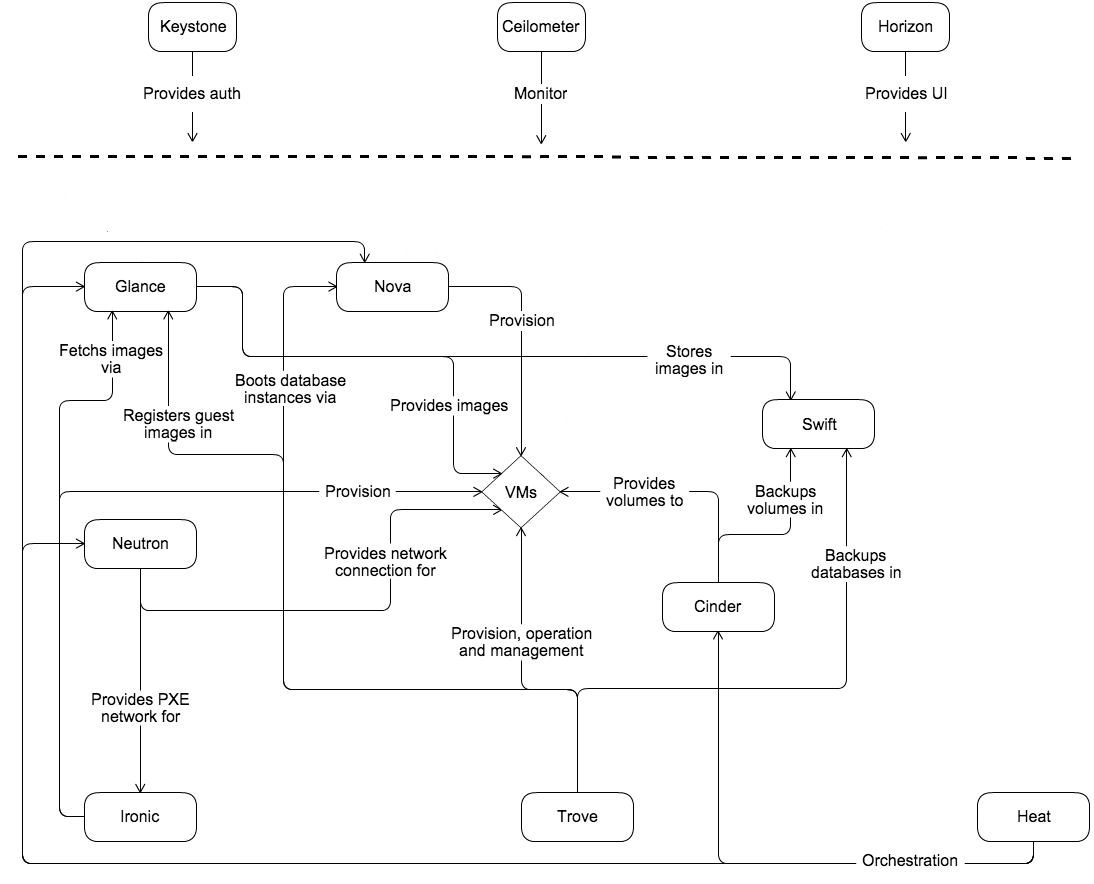
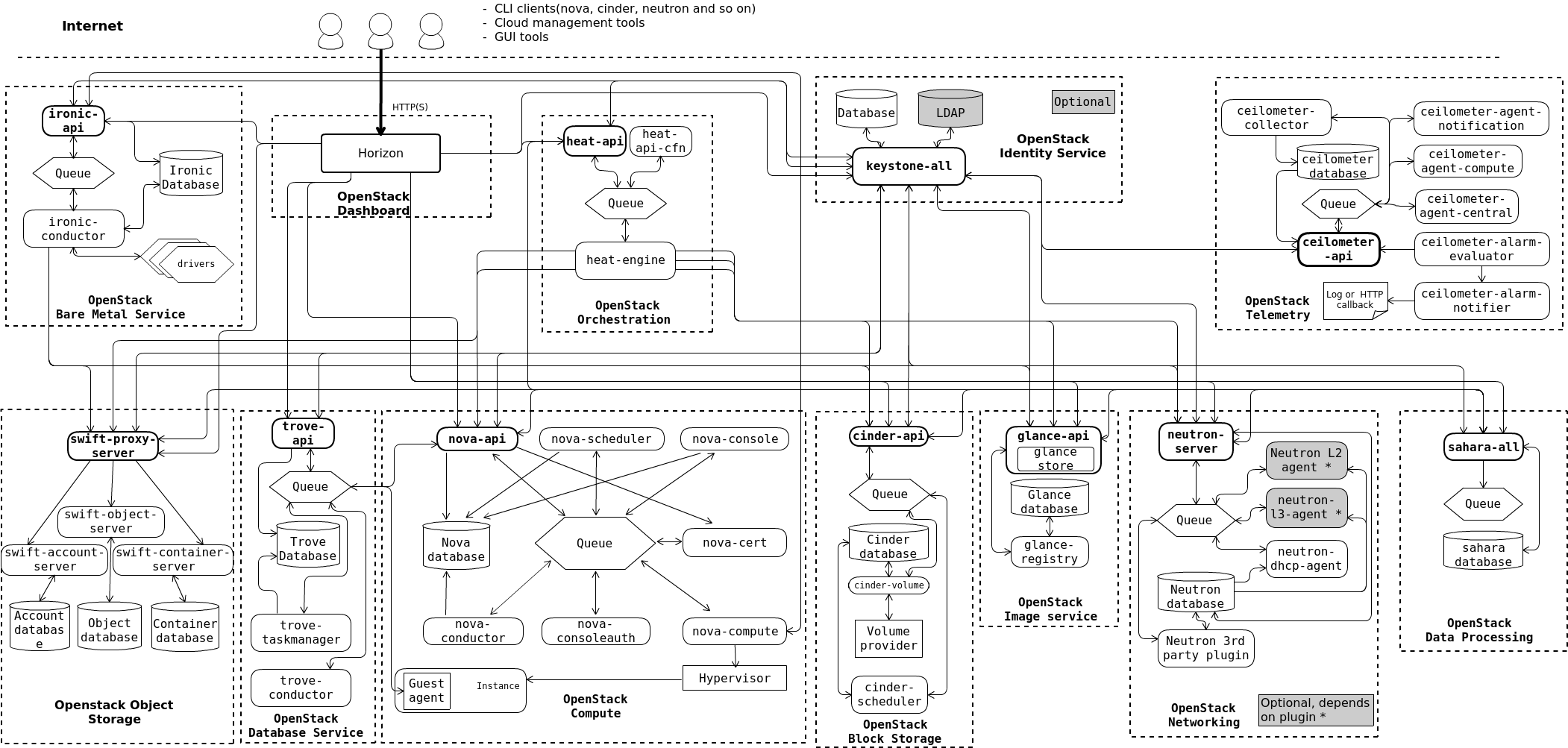
deployment
Kolla-Ansible
- GitHub - openstack/kolla-ansible: Ansible deployment of the Kolla containers. Mirror of code maintained at opendev.org.
- 從裸機到雲端 -- 30 天教你蓋雲端 :: 2021 iThome 鐵人賽
- Deploy Production Ready OpenStack Using Kolla Ansible | by Ach.Chusnul Chikam | Medium
- How to Prepare and Use Kolla Ansible | OpenMetal Docs
- :star:Automated Multinode OpenStack Deployment with Kolla-Ansible
- Build Private Cloud with OpenStack Kolla-ansible Step by Step Guide 1.0 -Part 6-Deploy Openstack with Kolla-ansible | by Kevin W Tech Notes | Medium
- :star:How to Implement an OpenStack-Based Private Cloud with Kolla-Ansible - Part 2 - Superuser
MicroStack
- OpenStack for the edge, micro clouds and developers
- OpenStack tutorials on Ubuntu | OpenStack | Ubuntu
- Navigate through the OpenStack dashboard menu | Ubuntu
- Interact with the SQL database service
- Tear down your OpenStack lab environment | Ubuntu
deploy for poc or test
foo@ted-1-ubuntu:~$ sudo snap install microstack --beta
[sudo] password for foo:
microstack (beta) ussuri from Canonical✓ installed
foo@ted-1-ubuntu:~$ sudo microstack init --auto --control
2022-12-01 00:15:01,868 - microstack_init - INFO - Configuring clustering ...
2022-12-01 00:15:01,989 - microstack_init - INFO - Setting up as a control node.
2022-12-01 00:15:04,856 - microstack_init - INFO - Generating TLS Certificate and Key
2022-12-01 00:15:05,706 - microstack_init - INFO - Configuring networking ...
2022-12-01 00:15:11,083 - microstack_init - INFO - Opening horizon dashboard up to *
2022-12-01 00:15:12,015 - microstack_init - INFO - Waiting for RabbitMQ to start ...
Waiting for 172.17.43.61:5672
2022-12-01 00:15:18,322 - microstack_init - INFO - RabbitMQ started!
2022-12-01 00:15:18,322 - microstack_init - INFO - Configuring RabbitMQ ...
2022-12-01 00:15:19,211 - microstack_init - INFO - RabbitMQ Configured!
2022-12-01 00:15:19,231 - microstack_init - INFO - Waiting for MySQL server to start ...
Waiting for 172.17.43.61:3306
2022-12-01 00:15:24,538 - microstack_init - INFO - Mysql server started! Creating databases ...
2022-12-01 00:15:25,933 - microstack_init - INFO - Configuring Keystone Fernet Keys ...
2022-12-01 00:15:36,216 - microstack_init - INFO - Bootstrapping Keystone ...
2022-12-01 00:15:48,198 - microstack_init - INFO - Creating service project ...
2022-12-01 00:15:54,069 - microstack_init - INFO - Keystone configured!
2022-12-01 00:15:54,088 - microstack_init - INFO - Configuring the Placement service...
2022-12-01 00:16:15,858 - microstack_init - INFO - Running Placement DB migrations...
2022-12-01 00:16:19,203 - microstack_init - INFO - Configuring nova control plane services ...
2022-12-01 00:16:31,690 - microstack_init - INFO - Running Nova API DB migrations (this may take a lot of time)...
2022-12-01 00:16:54,551 - microstack_init - INFO - Running Nova DB migrations (this may take a lot of time)...
Waiting for 172.17.43.61:8774
2022-12-01 00:17:37,624 - microstack_init - INFO - Creating default flavors...
2022-12-01 00:18:06,057 - microstack_init - INFO - Configuring nova compute hypervisor ...
2022-12-01 00:18:06,057 - microstack_init - INFO - Checking virtualization extensions presence on the host
2022-12-01 00:18:06,072 - microstack_init - WARNING - Unable to determine hardware virtualization support by CPU vendor id "GenuineIntel": assuming it is not supported.
2022-12-01 00:18:06,073 - microstack_init - WARNING - Hardware virtualization is not supported - software emulation will be used for Nova instances
2022-12-01 00:18:08,069 - microstack_init - INFO - Configuring the Spice HTML5 console service...
2022-12-01 00:18:08,551 - microstack_init - INFO - Configuring Neutron
Waiting for 172.17.43.61:9696
2022-12-01 00:19:27,731 - microstack_init - INFO - Configuring Glance ...
Waiting for 172.17.43.61:9292
2022-12-01 00:20:04,534 - microstack_init - INFO - Adding cirros image ...
2022-12-01 00:20:07,237 - microstack_init - INFO - Creating security group rules ...
2022-12-01 00:20:17,787 - microstack_init - INFO - Configuring the Cinder services...
2022-12-01 00:21:22,413 - microstack_init - INFO - Running Cinder DB migrations...
2022-12-01 00:21:30,160 - microstack_init - INFO - restarting libvirt and virtlogd ...
2022-12-01 00:21:53,115 - microstack_init - INFO - Complete. Marked microstack as initialized!
API
- Bare Metal API — Ironic API Reference documentation
- Identity API v3 (CURRENT) — keystone documentation
# get the token
curl -i -H "Content-Type: application/json"   -d '{
    "auth": {
      "identity": {
        "methods": ["password"],
        "password": {
          "user": {
            "name": "admin",
            "domain": { "name": "Default" },
            "password": "password"
          }
        }
      },
      "scope": {
        "system": {
            "all": true
        }
      }
    }
  }'   http://10.188.138.3:5000/v3/auth/tokens

curl -i -H "Content-Type: application/json"   -d '{
    "auth": {
      "identity": {
        "methods": ["password"],
        "password": {
          "user": {
            "name": "admin",
            "domain": { "name": "Default" },
            "password": "password"
          }
        }
      },
      "scope": {
        "project": {
            "domain": { "name": "Default" },
            "name": "demo-project-1"
        }
      }
    }
  }'   http://10.188.138.3:5000/v3/auth/tokens


export TOKEN=$(curl -s -i -H "Content-Type: application/json"   -d '{
    "auth": {
      "identity": {
        "methods": ["password"],
        "password": {
          "user": {
            "name": "admin",
            "domain": { "name": "Default" },
            "password": "password"
          }
        }
      },
      "scope": {
        "system": {
            "all": true
        }
      }
    }
  }'   http://10.188.138.3:5000/v3/auth/tokens | grep -Fi "x-subject-token" | awk '{print $2}' | tr -d '\r')
# list nodes
curl 'http://10.188.138.3:6385/v1/nodes' \
  -X GET \
  -H "X-OpenStack-Ironic-API-Version: 1.93" \
  -H "X-Auth-Token: $TOKEN"
# list instance
curl 'http://10.188.138.3:8774/v2.1/servers' \
  -H "X-Auth-Token: $TOKEN"

# get instance
curl 'http://10.188.138.3:8774/v2.1/servers/23ab45d5-4d80-4a9a-8a29-2e8d6ecbacc8' \
  -H "X-Auth-Token: $TOKEN"
# check the hypervisor stats
curl -H "X-Auth-Token: $TOKEN" http://10.188.138.3:8774/v2.1/os-hypervisors/statistics
The free_ram_mb is negative, indicating the cluster is over-provisioned or fully occupied.
{
  "hypervisor_statistics": {
    "vcpus_used": 45,
    "memory_mb_used": 272000,
    "free_ram_mb": -272000,
    "running_vms": 10
  }
}
# List All the Images
curl -X GET http://10.188.138.3:9292/v2/images \
  -H "X-Auth-Token: $TOKEN"

# Find Network ID
curl -H "X-Auth-Token: $TOKEN" http://10.188.138.3:9696/v2.0/networks

# Find Network ID
curl -H "X-Auth-Token: $TOKEN" http://10.188.138.3:8774/v2.1/flavors

# Launch Instance Template
curl -X POST http://10.188.138.3:8774/v2.1/servers \
  -H "X-Auth-Token: $TOKEN" \
  -d '{
    "server": {
        "name": "foo-api-vm",
        "imageRef": "30a44daf-888a-4cf3-93d0-67f46d603daf",
        "flavorRef": "fdc2c2e8-f676-40f0-9c0d-9dffb595775a",
        "availability_zone": "nova",
        "networks": [
            { "uuid": "b4be7b5a-193e-47ad-b3ed-1a8bdcec7f0f" }
        ]
    }
}'